Publish websites, LPs, apps, 3D, games, and more on the ICP decentralized cloud.
From a Web2 hosting alternative to a decentralized app platform operated with AI and CLI.
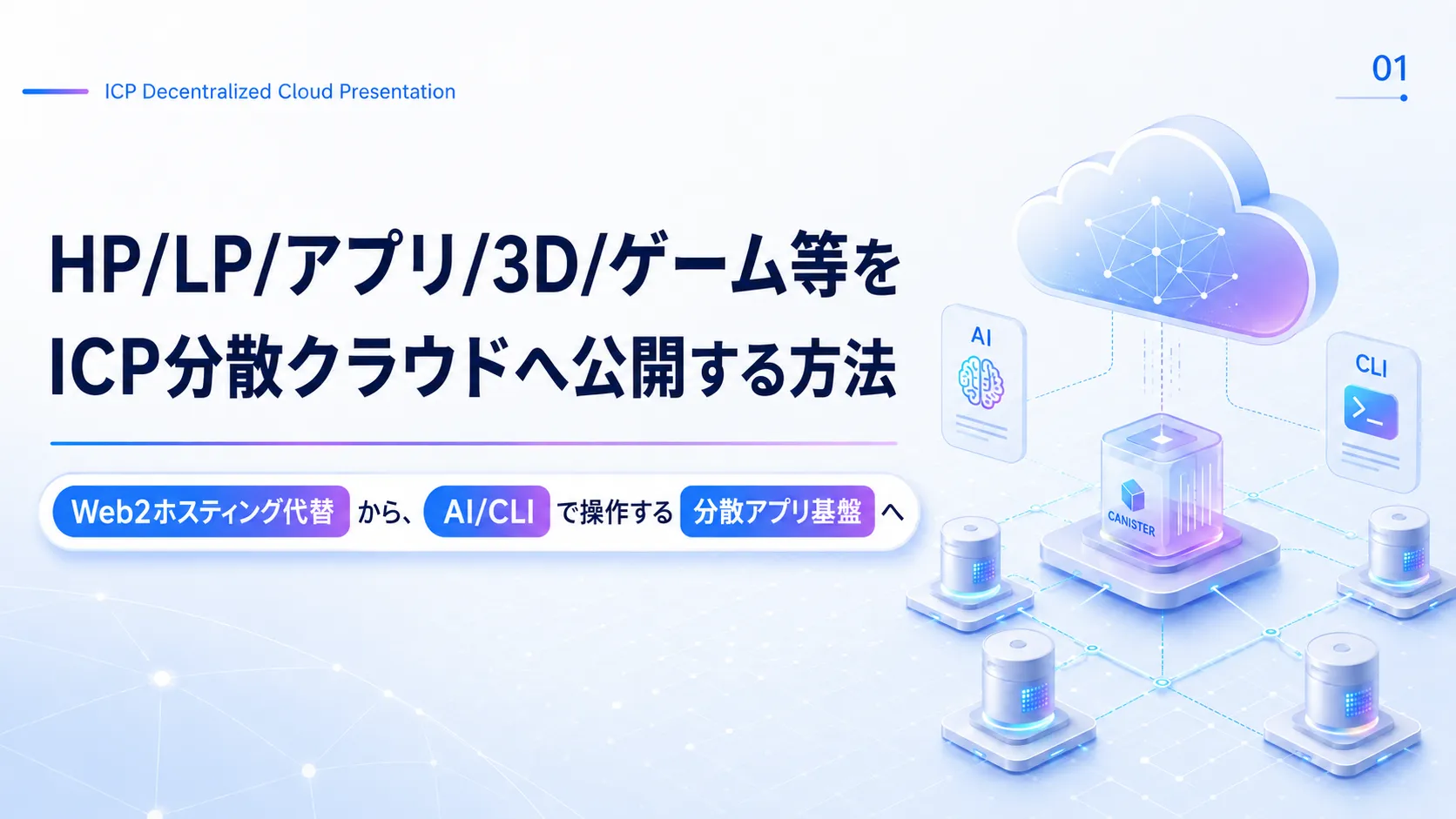
Note: The text in the slides is in Japanese. The page text explains each slide in English.
This Sho T official site itself is published on the ICP decentralized cloud. This page is both an explainer and a working demo of ICP Sovereign Cloud.
Why ICP
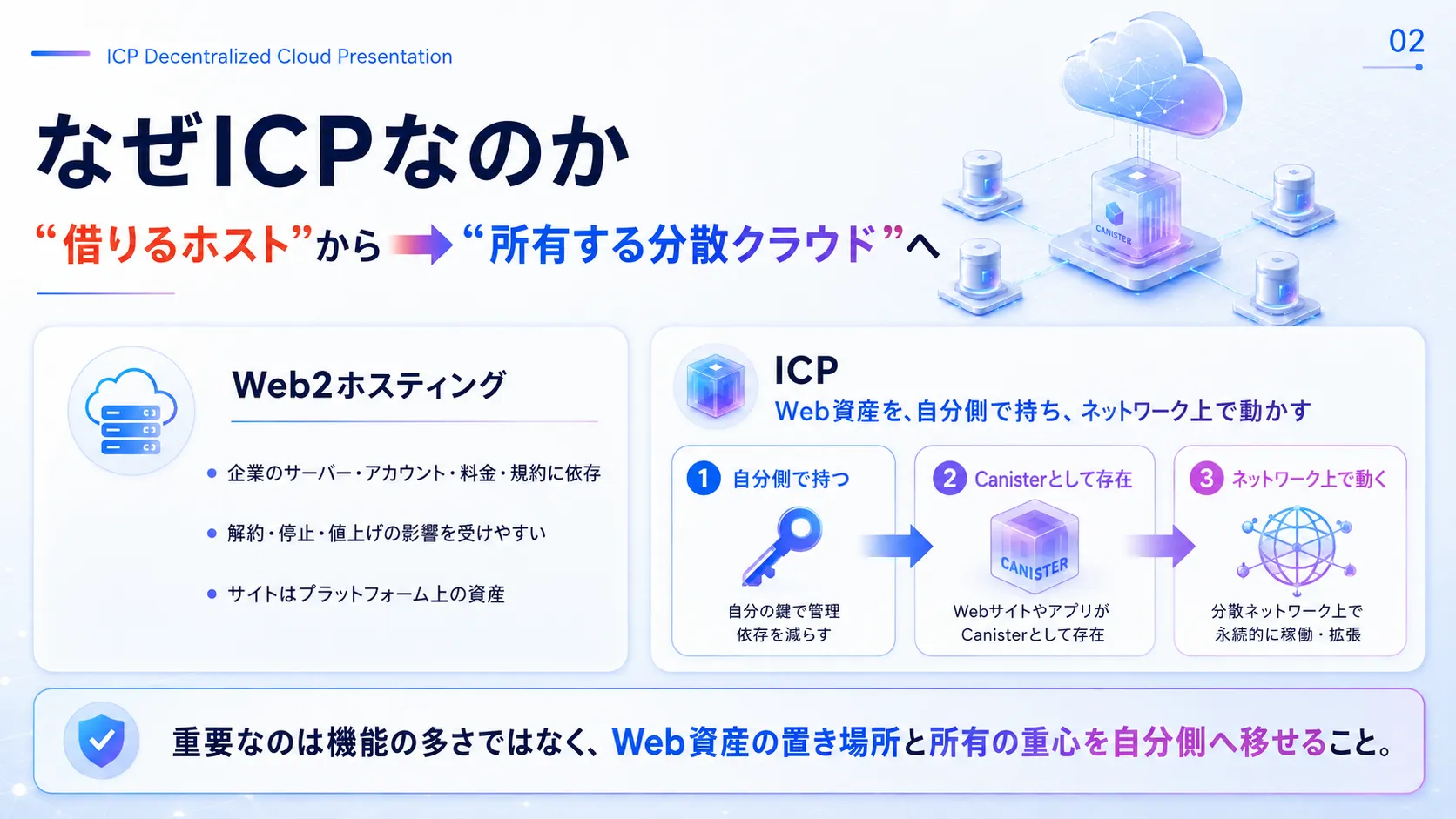
Vercel, AWS, and SaaS tools like Wix can already handle websites, APIs, external integrations, and AI. So the value of ICP is not simply added features.
The essence of ICP is that by placing websites and apps on a decentralized cloud maintained by cryptography—rather than on servers run by a particular operator—you can turn them into real entities on Canisters that you manage with your own identity.
What does that mean?
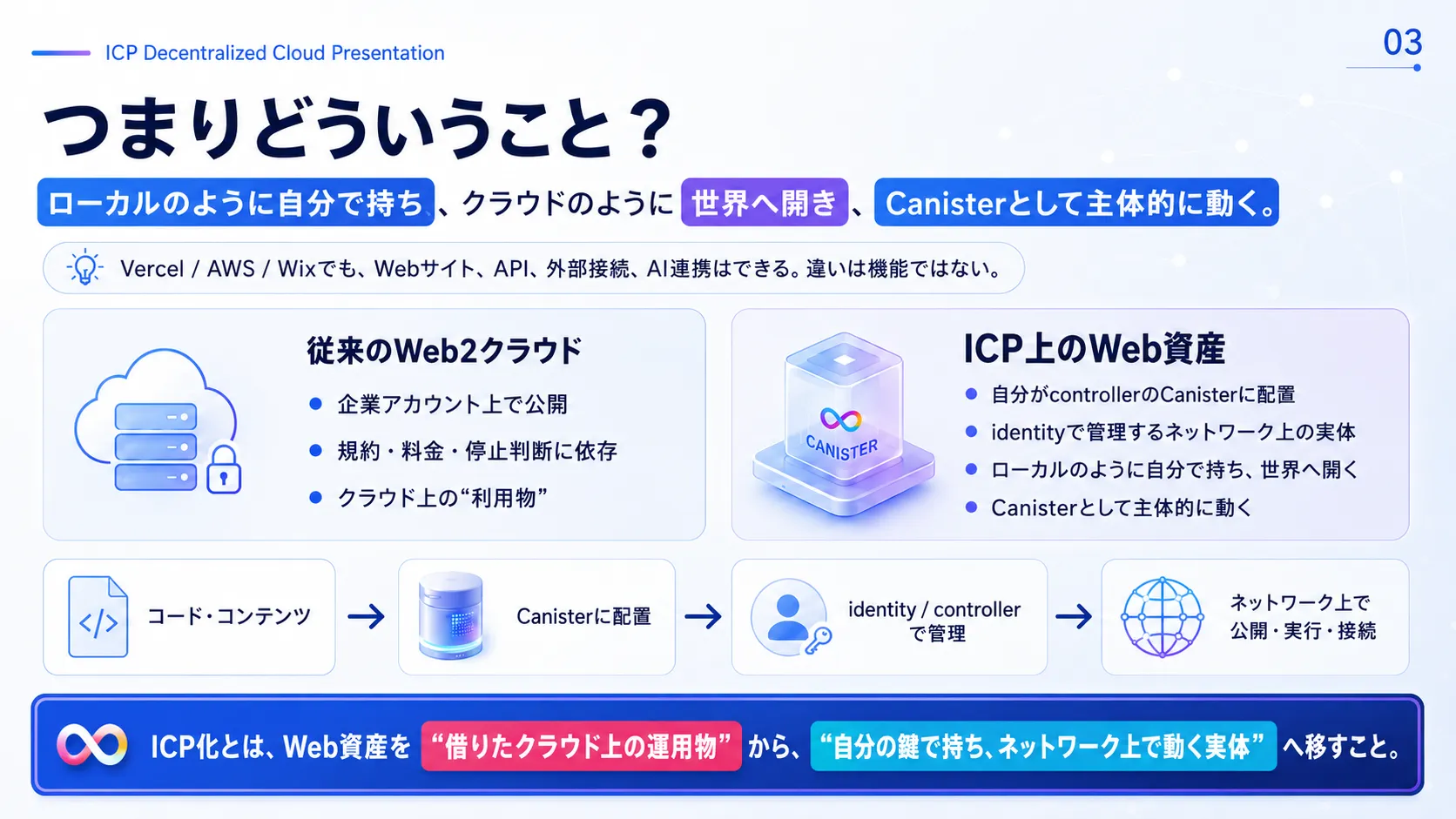
Files on your local PC are fully under your control, but they stay closed on your machine. A typical cloud can publish to the world, but it depends on the accounts and services of large companies.
With ICP, you can keep web assets under your own ownership (signed with your private key) while publishing, running, and connecting them on the network. In other words, it fundamentally changes how web assets are held.
Bonus: Dramatically Cheaper
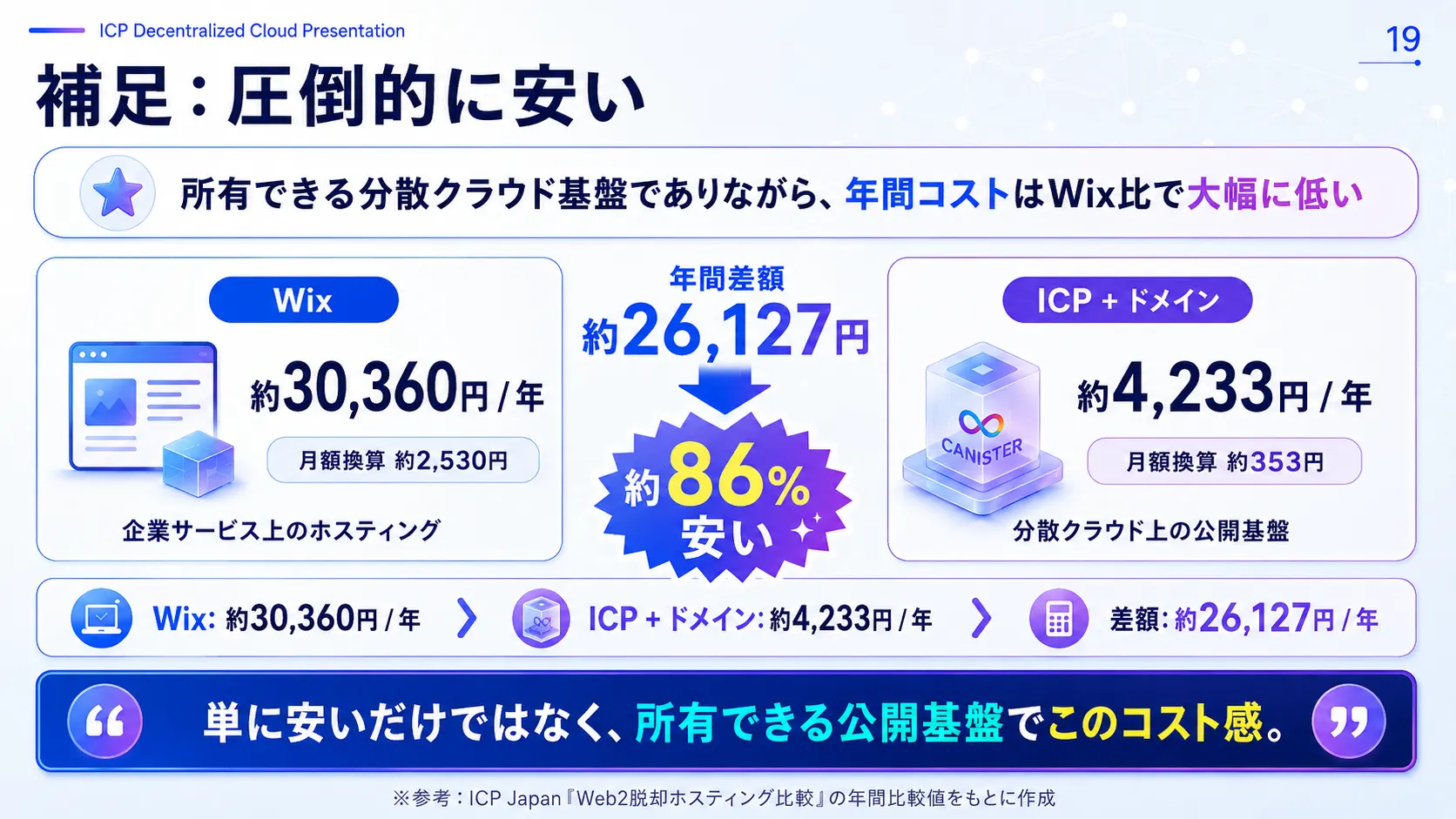
If price were all that mattered, there are other options such as free hosting. What matters most here is that this is a publishing platform you fully own with your own keys, and yet it runs at an extremely low maintenance cost.
* Based on annual figures from ICP Japan’s “Moving Beyond Web2 Hosting” comparison.
Today's Goal
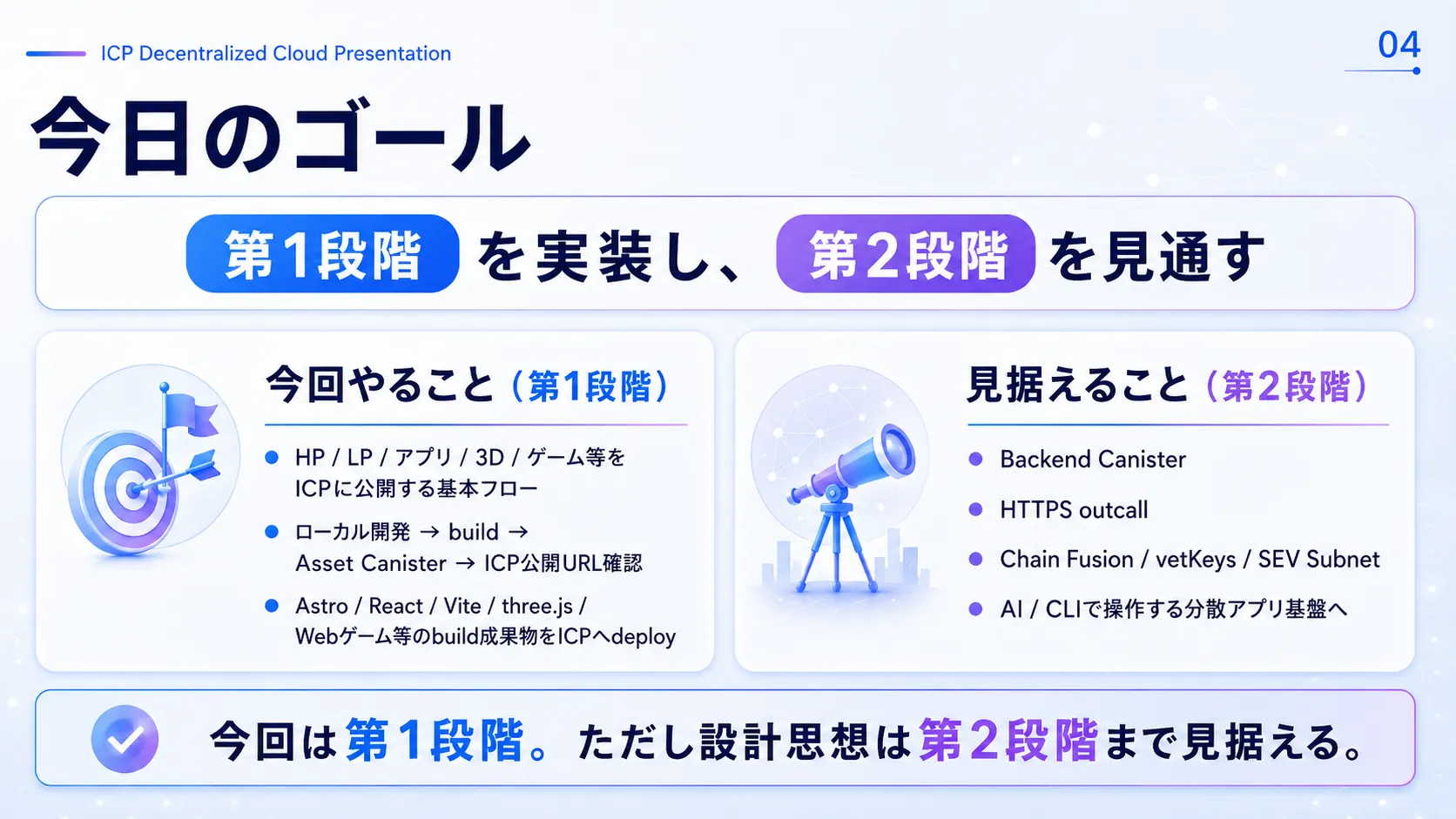
- Stage 1 (publishing flow): Understand the flow from local development → build → Asset Canister sync → checking the public ICP URL.
- Stage 2 (extensions): See the path toward Backend Canisters, HTTPS outcalls, Chain Fusion, vetKeys, SEV Subnets, and AI / CLI operation.
What You Can Publish
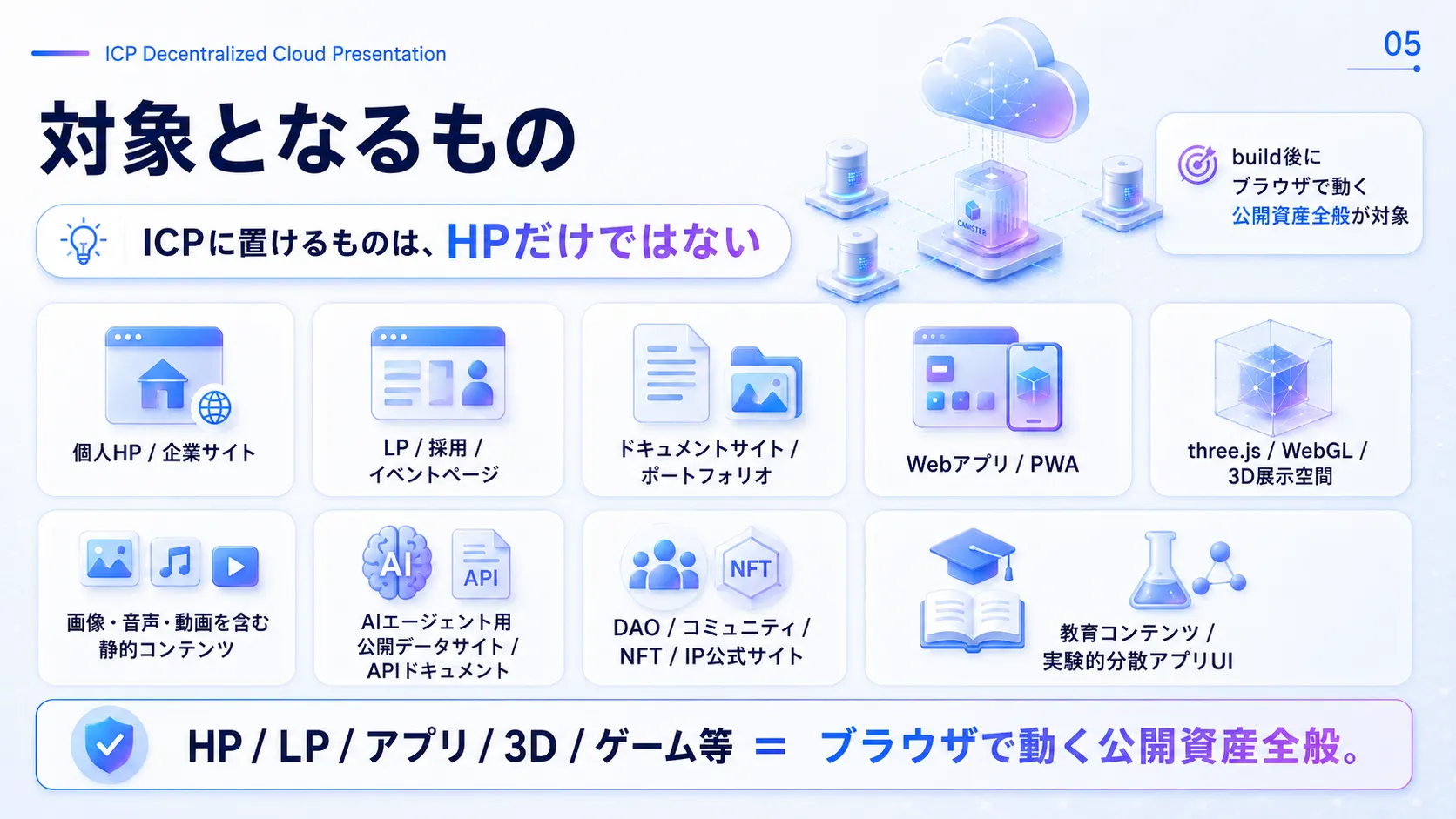
Anything published that runs in a browser can go on ICP.
- Personal websites, portfolio sites, corporate sites
- Promotional LPs, event pages, recruiting sites
- Documentation sites and wikis, like GitHub Pages
- Web applications and PWAs built with React, Vue, and more
- 3D exhibition spaces and metaverse front ends built with three.js / WebGL
- Browser games built with WebGL
Start with Static Hosting
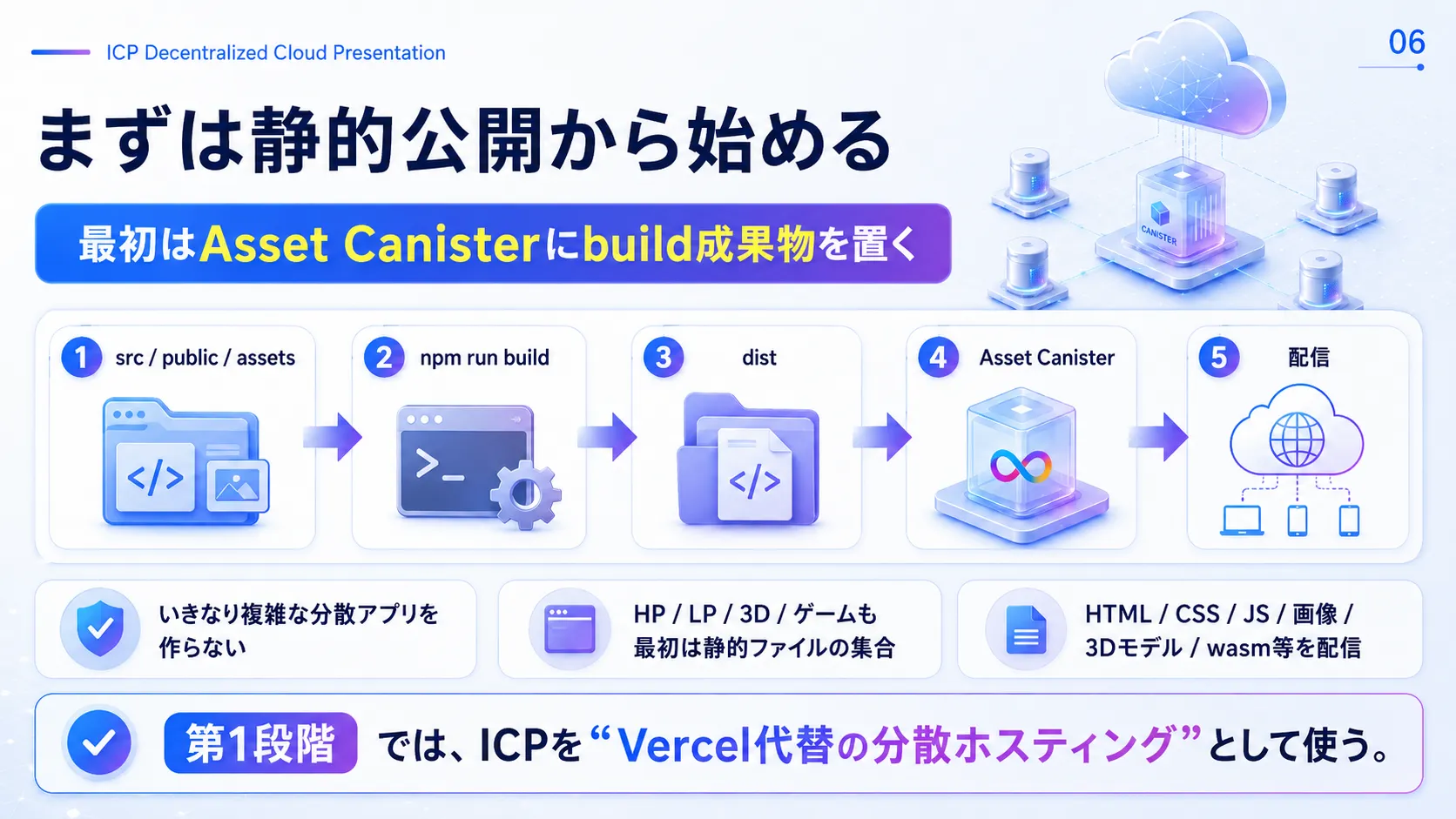
You don't need to start by writing blockchain code (smart contracts). Just as in normal web development, deploy the static assets generated by `npm run build` (build output such as `dist/`) to ICP.
In Stage 1, ICP is used as “secure decentralized hosting that replaces Vercel or Netlify.”
Overall Architecture
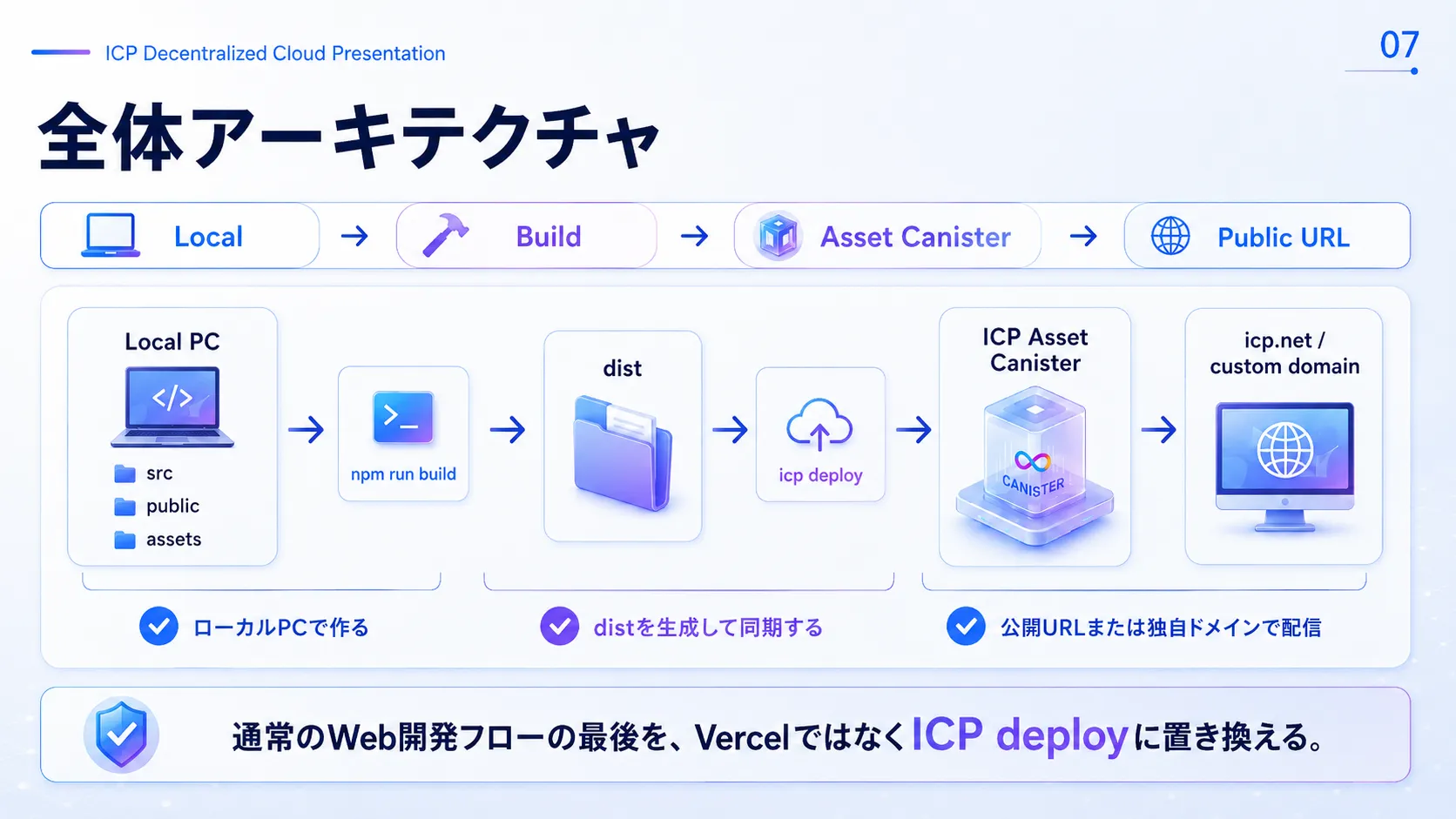
- Local: Write and edit code locally with tools like VS Code.
- Build: Generate the `dist/` directory with `npm run build` or similar.
- Asset Canister: Sync the generated `dist/` to an “Asset Canister” on ICP (by running the sync command).
- Public URL: Access it from anywhere in the world via a raw URL such as `icp0.io` or `ic0.app`, or via your own domain through DNS.
Case Study: The Sho T Website
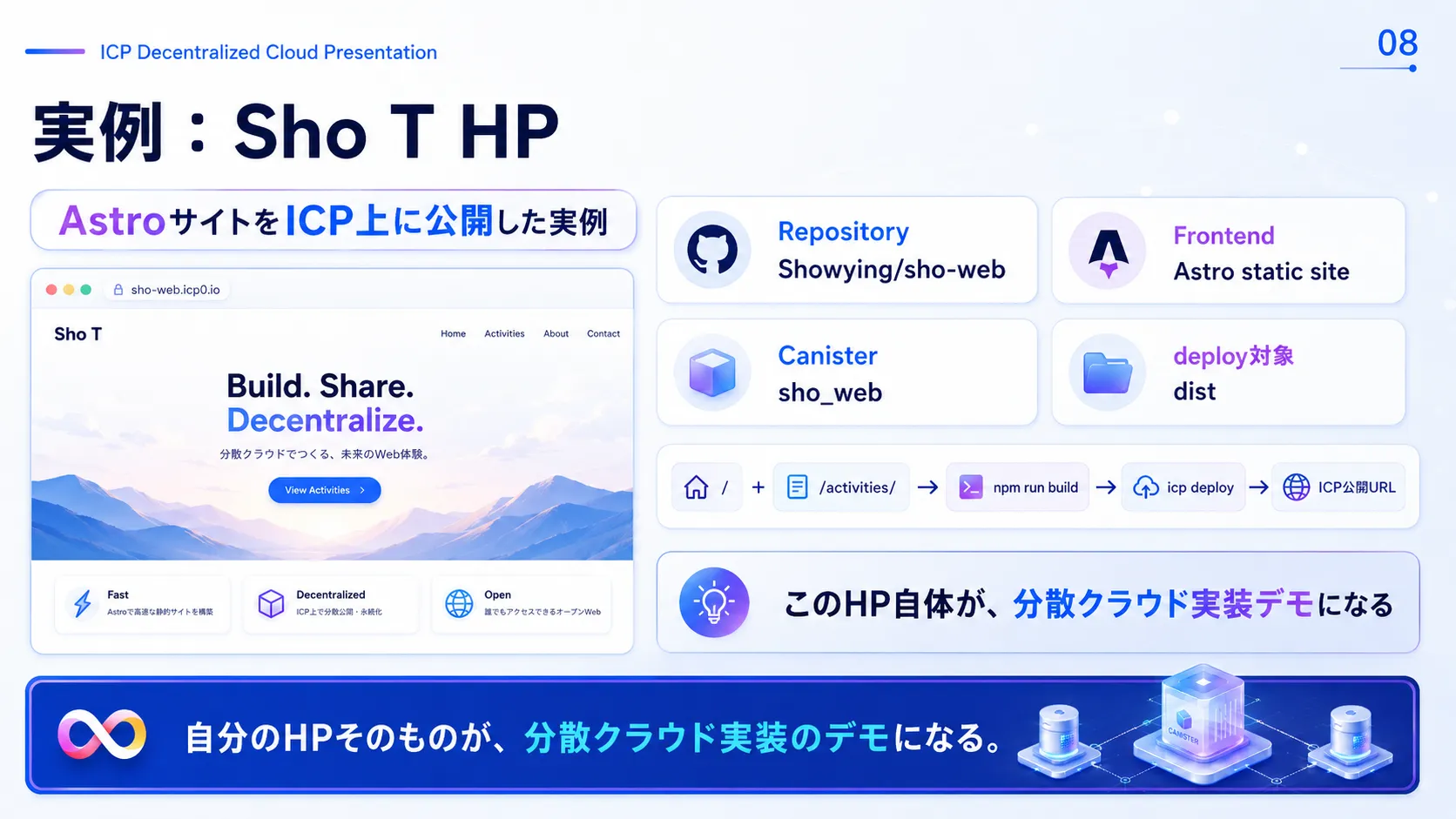
Sho T's official site is a modern static site built with Astro. The repository is `Showying/sho-web`, and its build output, `dist/`, is synced directly to an ICP Asset Canister.
Including this LP (`/lp/icp-sovereign/`) you are reading now, everything is a real, working demo running on a decentralized network.
What You Need
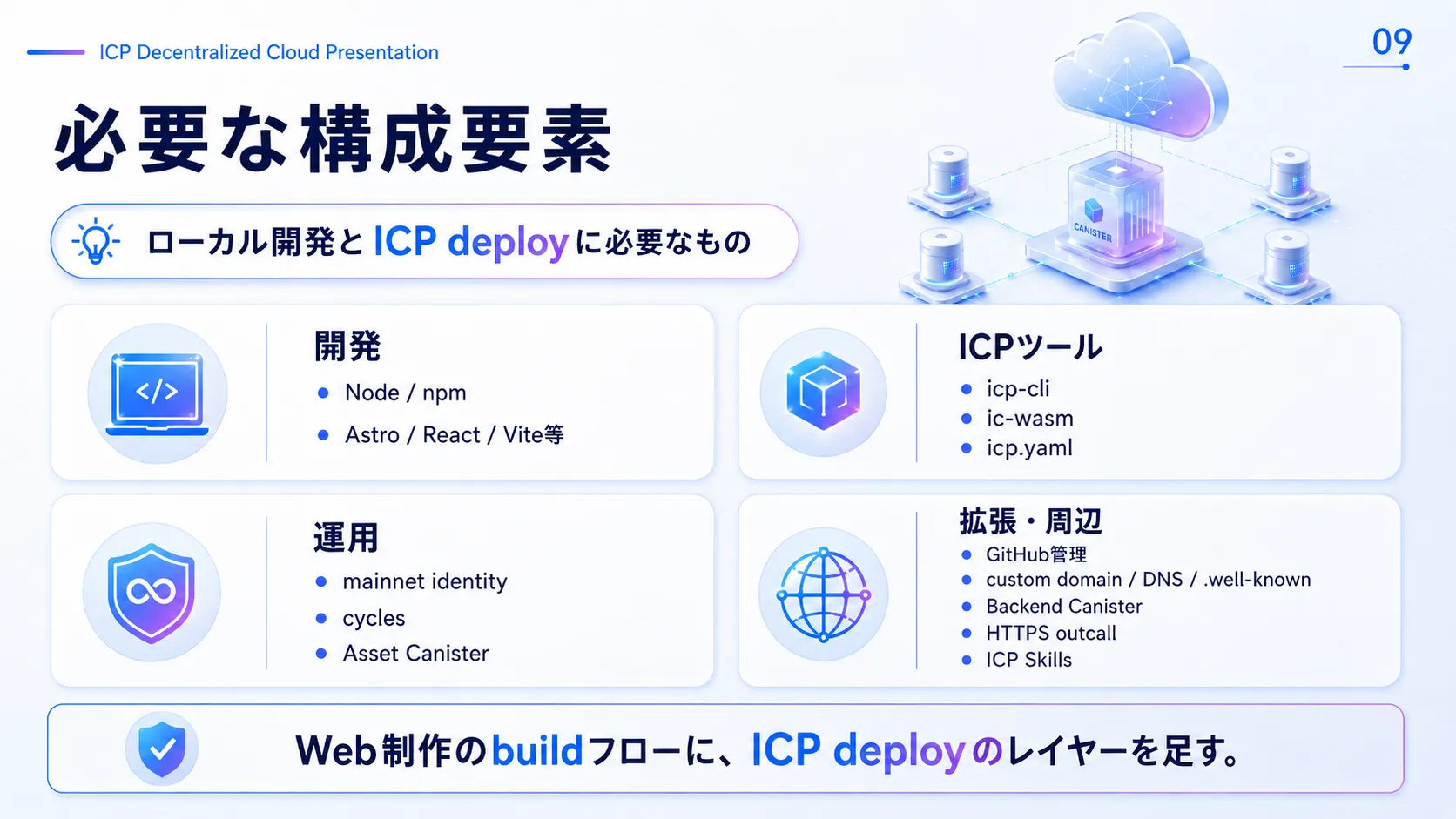
Publishing on ICP only requires a few additions to a normal web development setup.
- Front-end environment: Node.js / npm and your framework of choice, such as Astro, React, Vue, or Vite.
- ICP tools: CLIs such as `icp-cli` (or dfx) and `ic-wasm`.
- Config file: `icp.yaml` (or `dfx.json`), which describes where assets are synced.
- Crypto assets and keys: A mainnet Identity (private key file) for signing deploys, and Cycles to pay deployment fees.
How icp.yaml Works
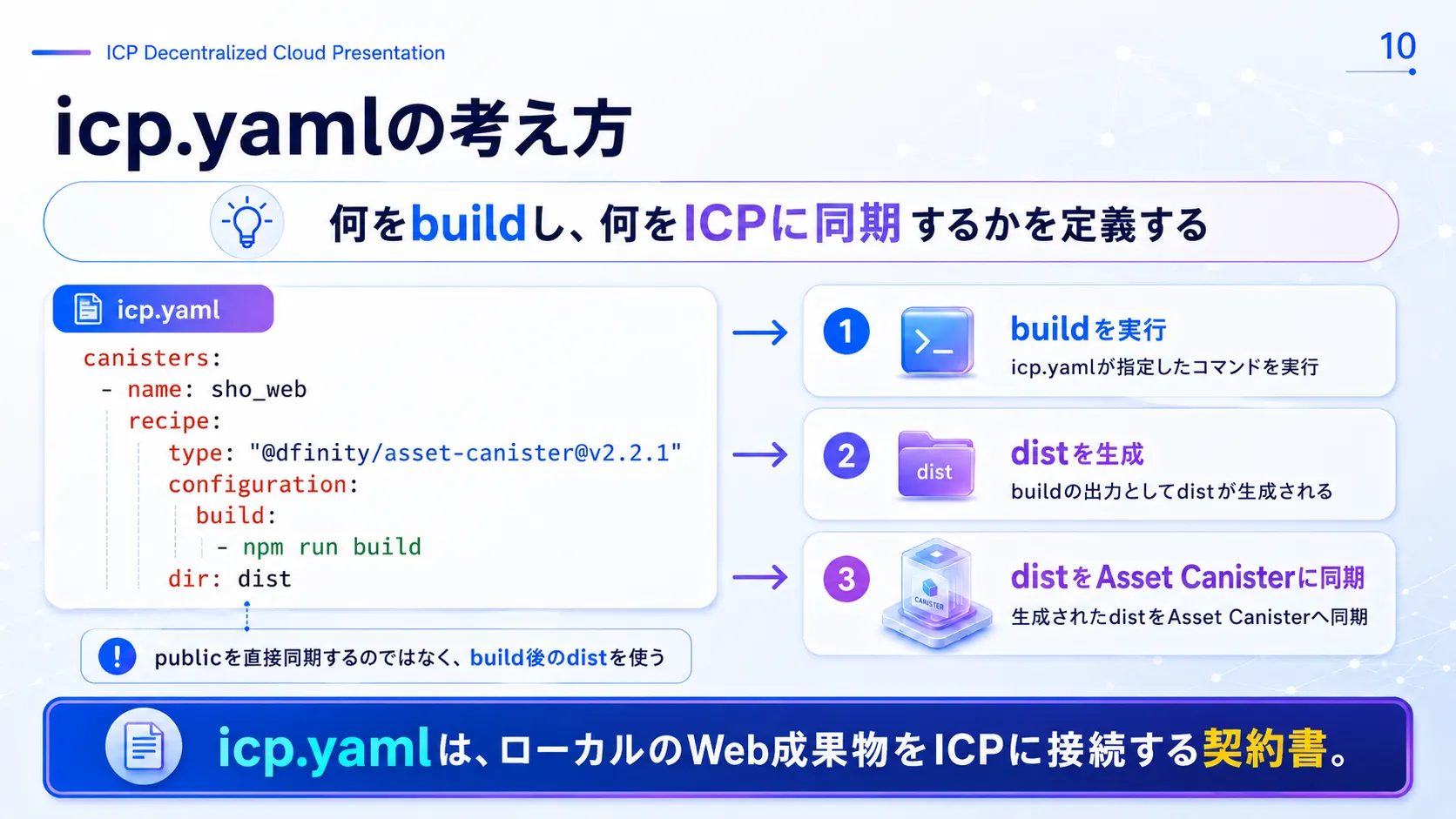
`icp.yaml` is the core configuration file for deploying to ICP. It defines the flow: run `npm run build` to generate `dist/`, then sync the static files in `dist/` to the Asset Canister. Rather than syncing the original `public/` directory directly, you specify the finished build output from Astro or similar tools (such as `dist/`) as the upload source.
Deploy Steps
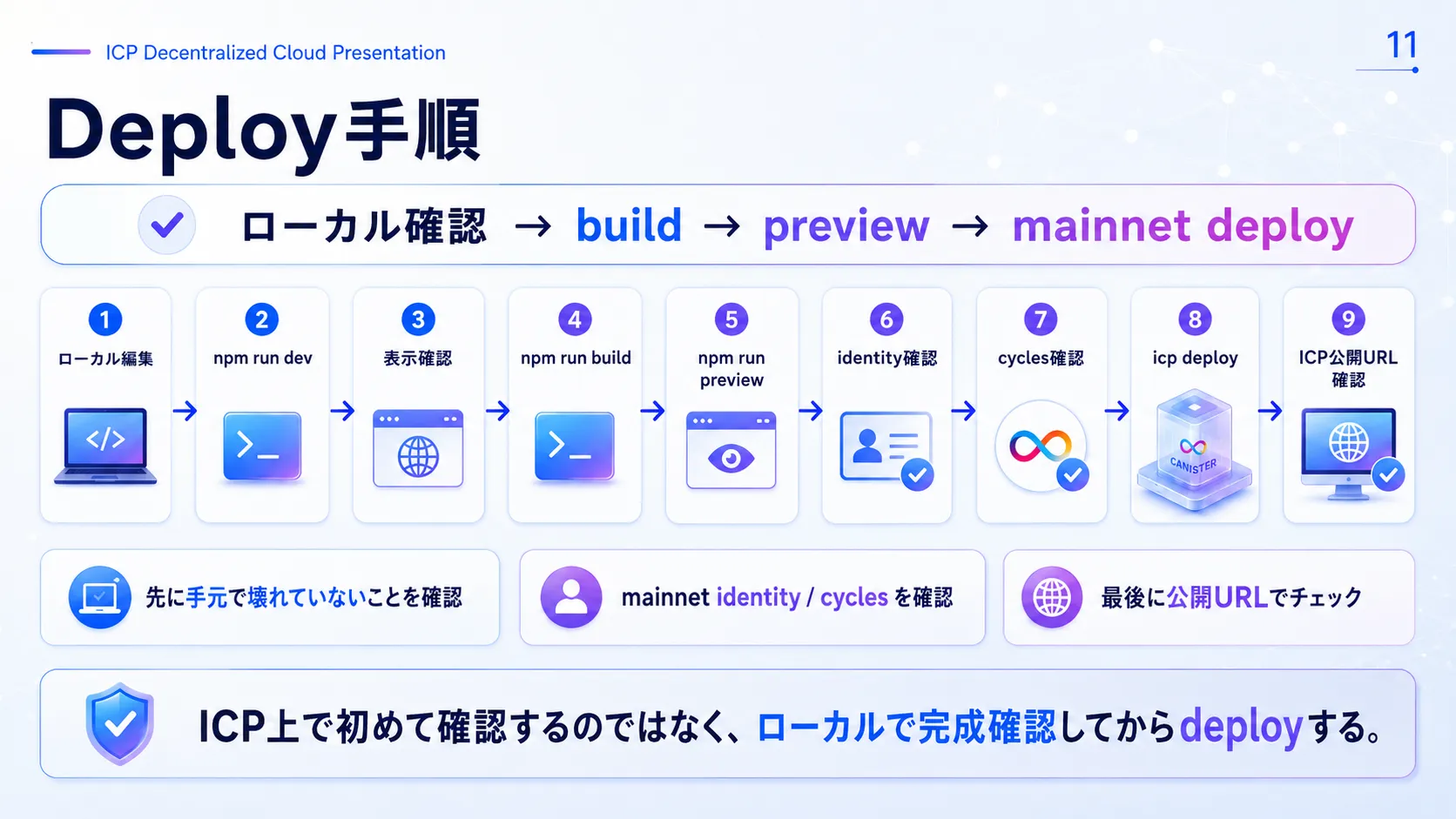
npm run dev
# 2. Generate the static build output
npm run build
# 3. Check the build output locally
npm run preview
# 4. After checking your Identity and Cycles, deploy to the ICP mainnet
icp deploy --network mainnet
Don't check the site for the first time on ICP—deploy only after confirming locally that it is complete.
What Changes by Type
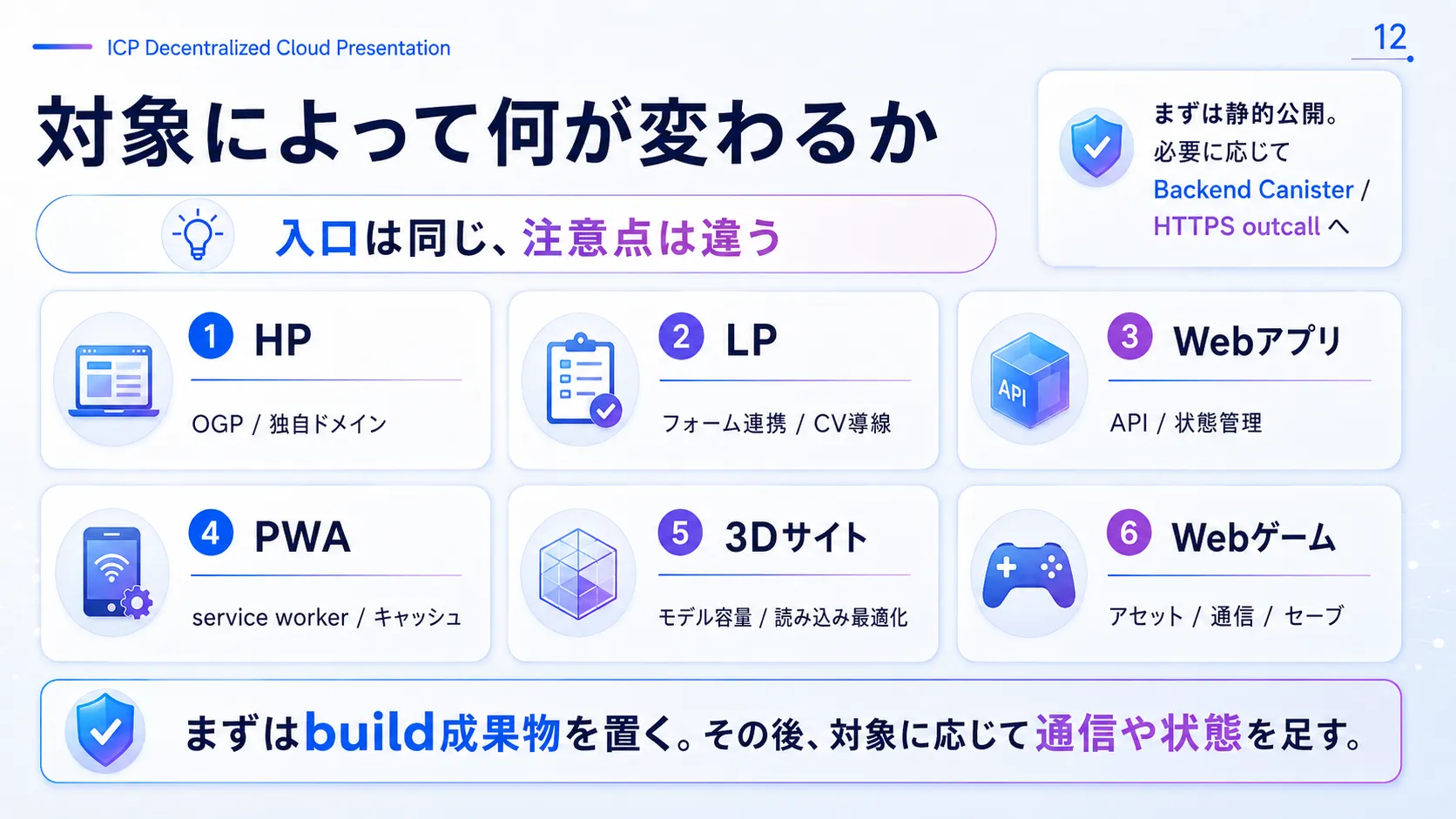
Websites, LPs, web apps, 3D sites, web games—the basic steps to upload to ICP (using an Asset Canister) are the same for all. But what to watch out for depends on the nature of the content.
- Websites and LPs: SEO is key—custom domains, canonical URLs, OGP images, and so on.
- Web apps and PWAs: API integration, client-side state management, and routing.
- 3D sites (three.js): Reducing the size of 3D models and speeding up and optimizing loading.
- Web games: Asset delivery, serverless communication for multiplayer, and saving game data.
Security and Operating Rules
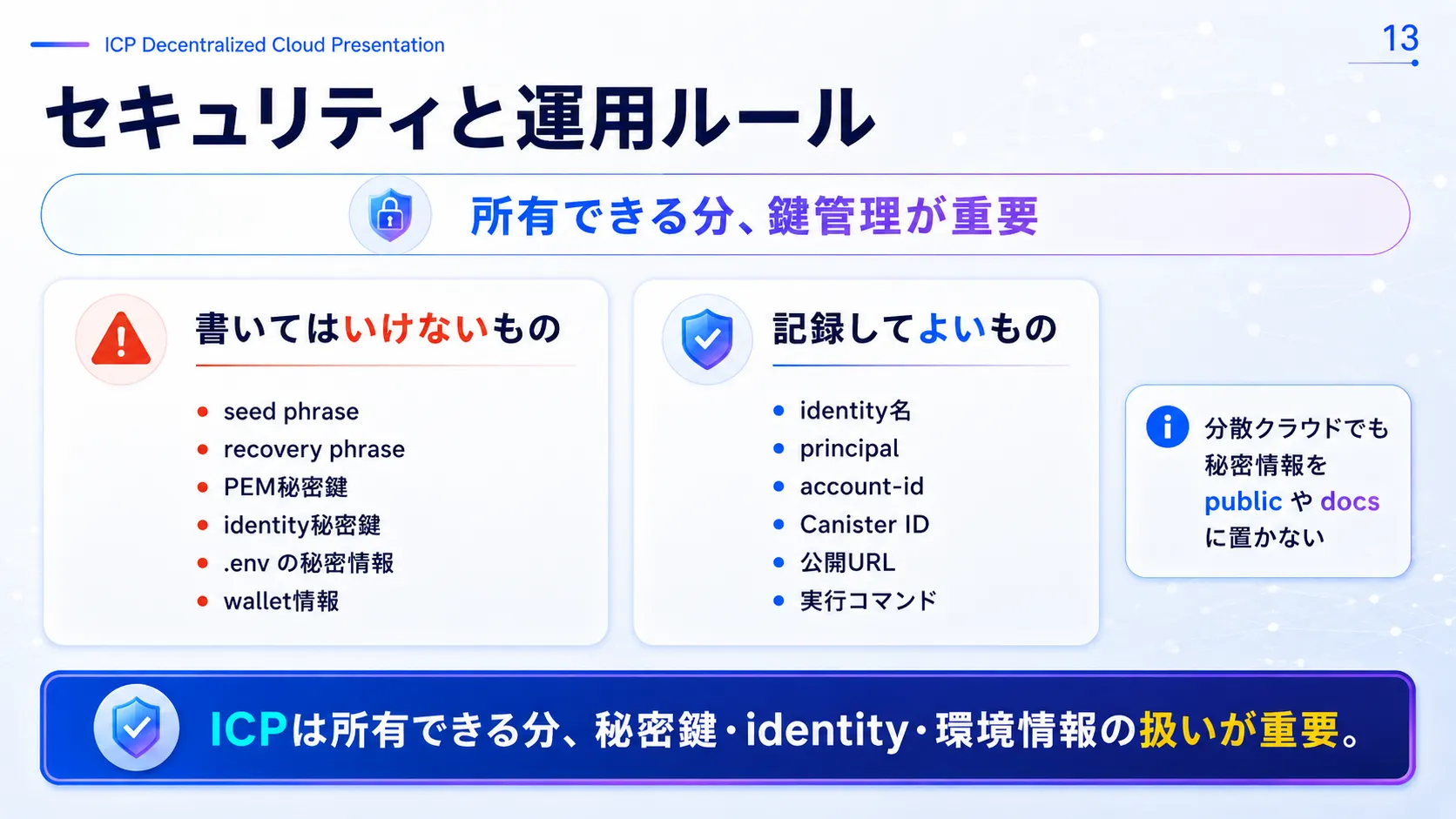
On ICP, you own and manage your web assets with your own keys. That means the following secrets must never be published, leaked, or recorded.
- Never disclose: seed phrases, recovery phrases, PEM private key files, identity private keys, secrets such as API keys in `.env`, and wallet private keys.
- Safe to publish or record: identity names (local names), Principal IDs, Account IDs, Canister IDs, public URLs, CLI commands you ran, and so on.
Using a Custom Domain
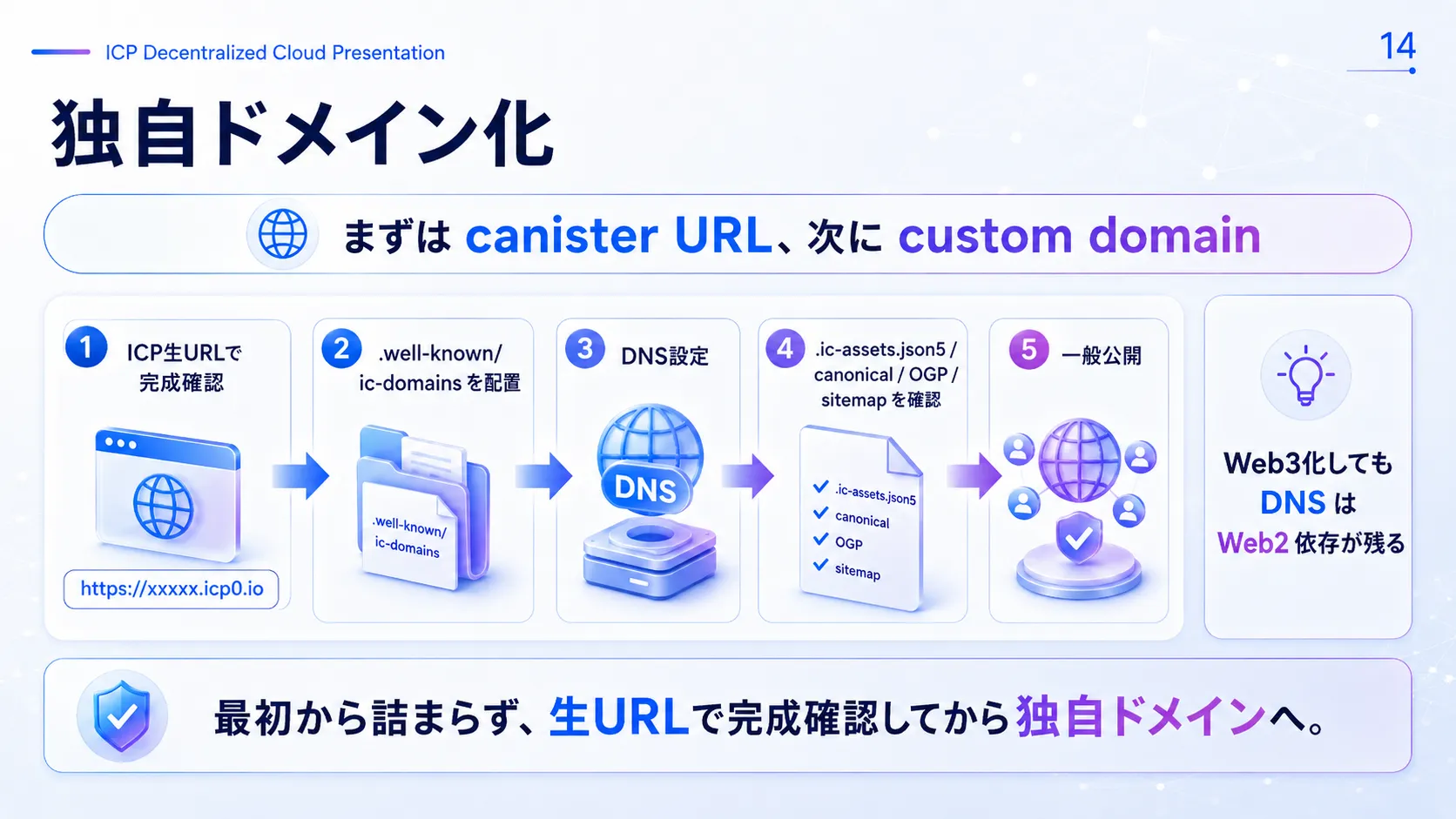
Setting up a custom domain from the start can be confusing, so first deploy and check using a raw Canister URL such as `*.icp0.io`.
Then move on to going public: add the `.well-known/ic-domains` file, set DNS records, configure the Asset Canister (`.ic-assets.json5`), and update canonical URLs, OGP, and the sitemap.
Troubleshooting
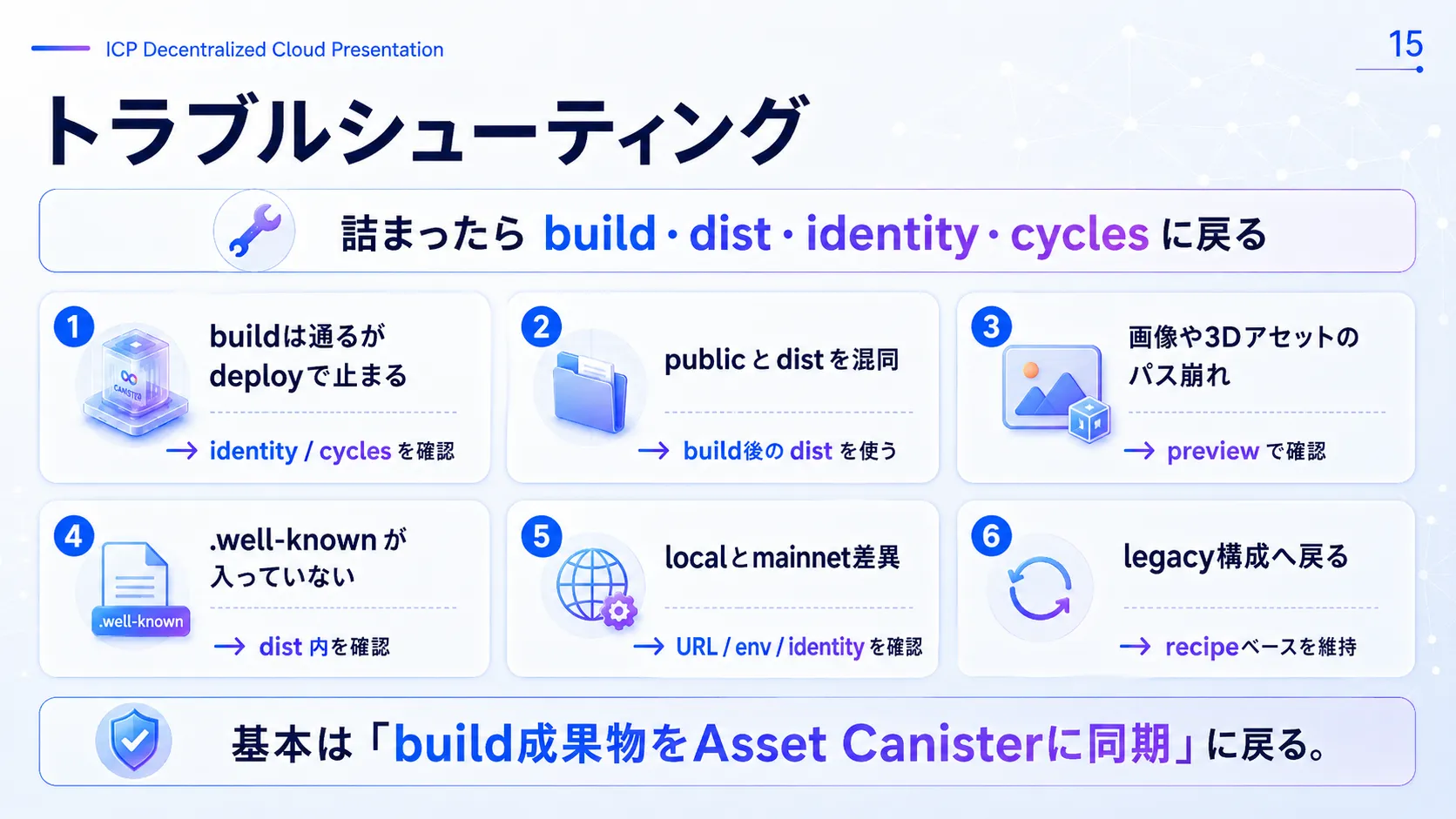
If something goes wrong when deploying or accessing the site, go back and check these basics.
- Build errors: Does the local build (`npm run build`) really succeed?
- Sync directory: Are you confusing `public` with the build output `dist`? Is the sync source in `icp.yaml` correct?
- Permissions and fees: Is the right identity private key specified, and does the Canister have enough Cycles to pay deployment fees?
- Broken asset paths: Before deploying, check with `npm run preview` that images, 3D models, and other assets load correctly.
Next Phase
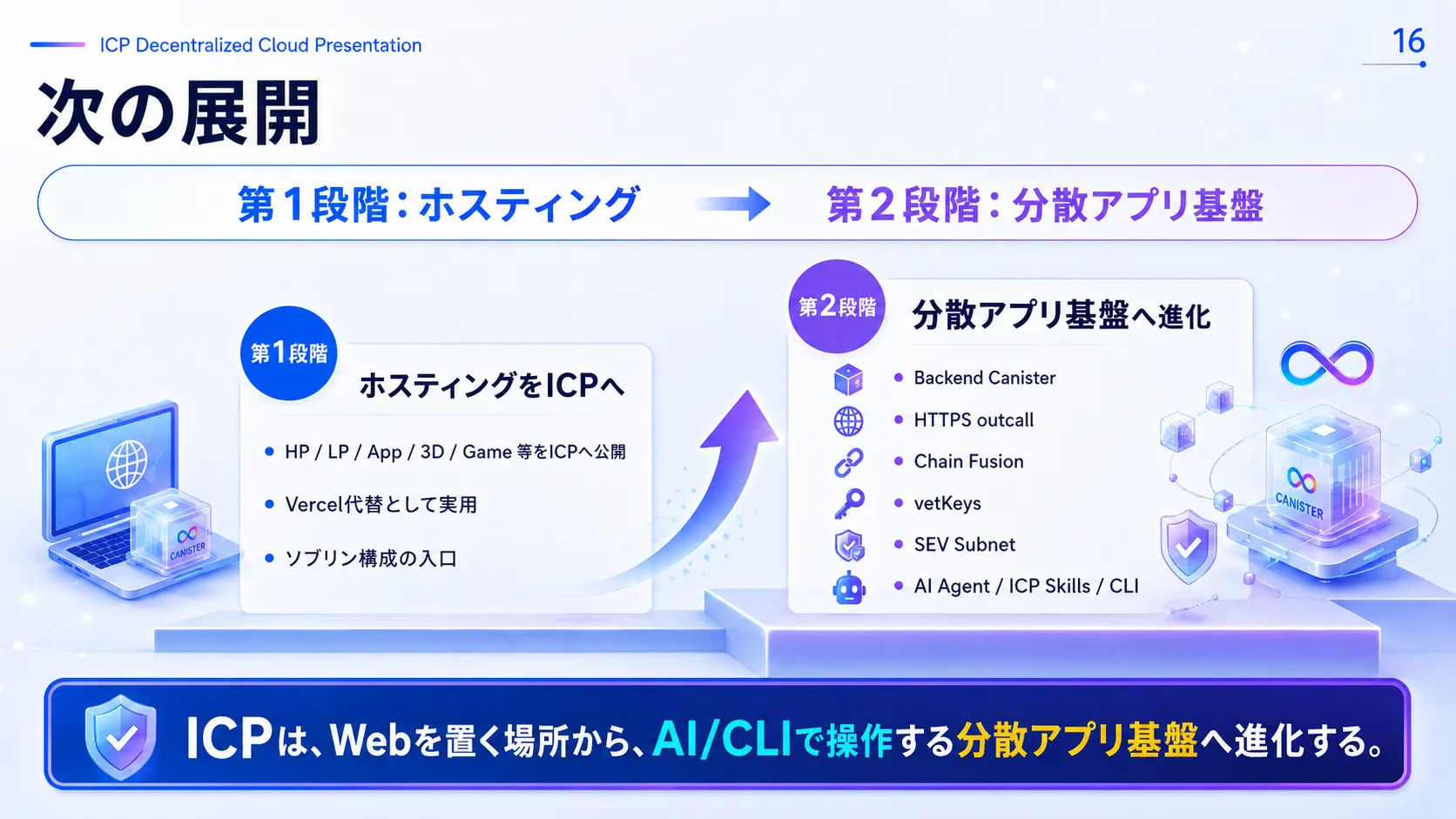
In Stage 1, ICP was used simply as static hosting in place of Vercel or Wix.
From here, Stage 2 lets you extend it into a robust, autonomous decentralized app platform—adding Backend Canisters, HTTPS Outcalls to call external APIs, Chain Fusion to read and write with other chains, vetKeys for on-chain encryption, SEV Subnets to protect confidential data, and integration with AI agents, CLI, and ICP Skills.
The Vision Beyond
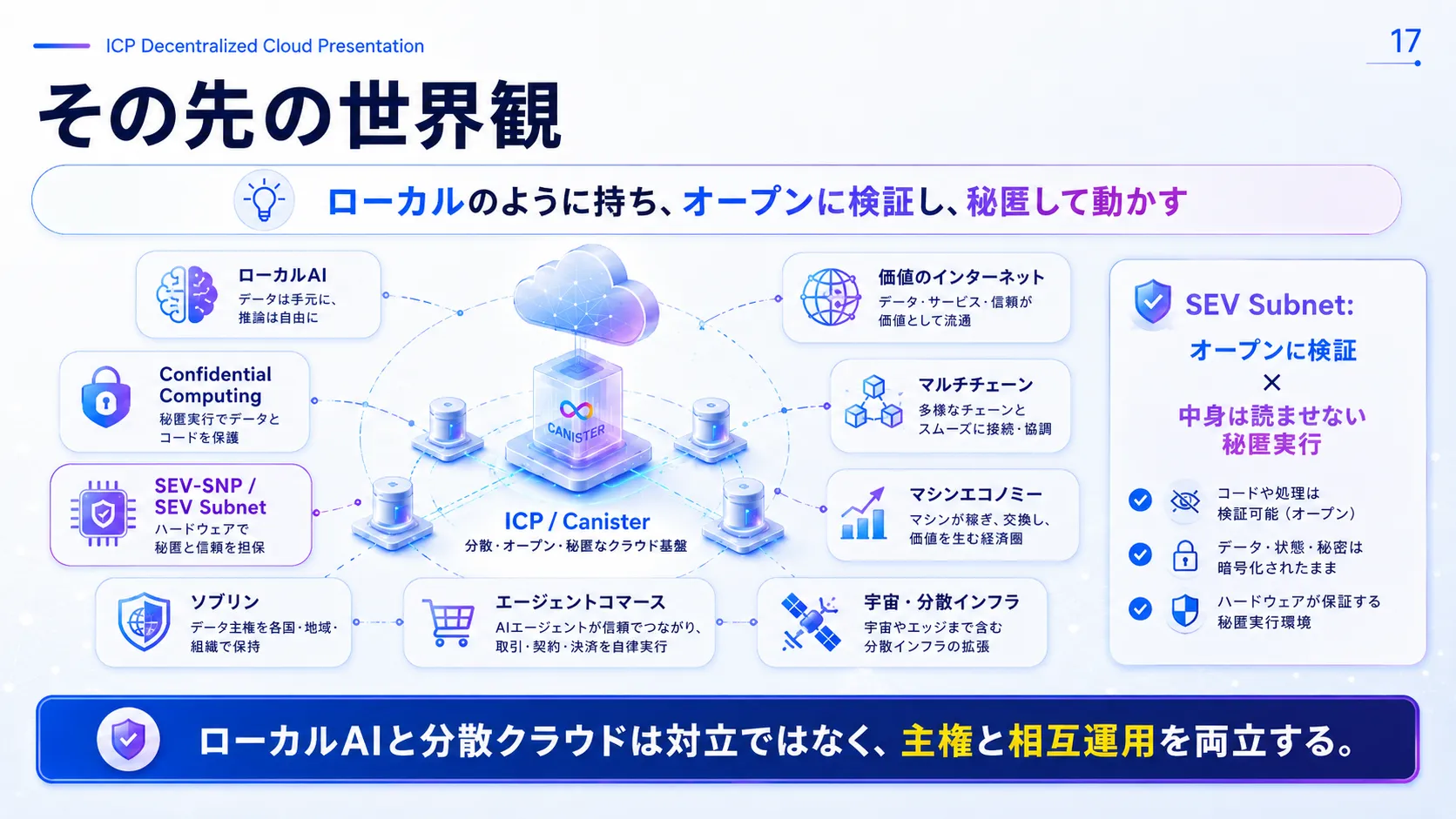
Beyond that lie local AI, confidential computing, SEV Subnets, the establishment of sovereignty, transactions by AI agents (agentic commerce), the internet of value, integration of multiple chains, the machine economy, and connections to space and decentralized infrastructure.
Local AI and the decentralized cloud are not in opposition; together they become the infrastructure of a future that achieves “individual sovereignty” and “trustworthy interconnection” at the same time.
Summary
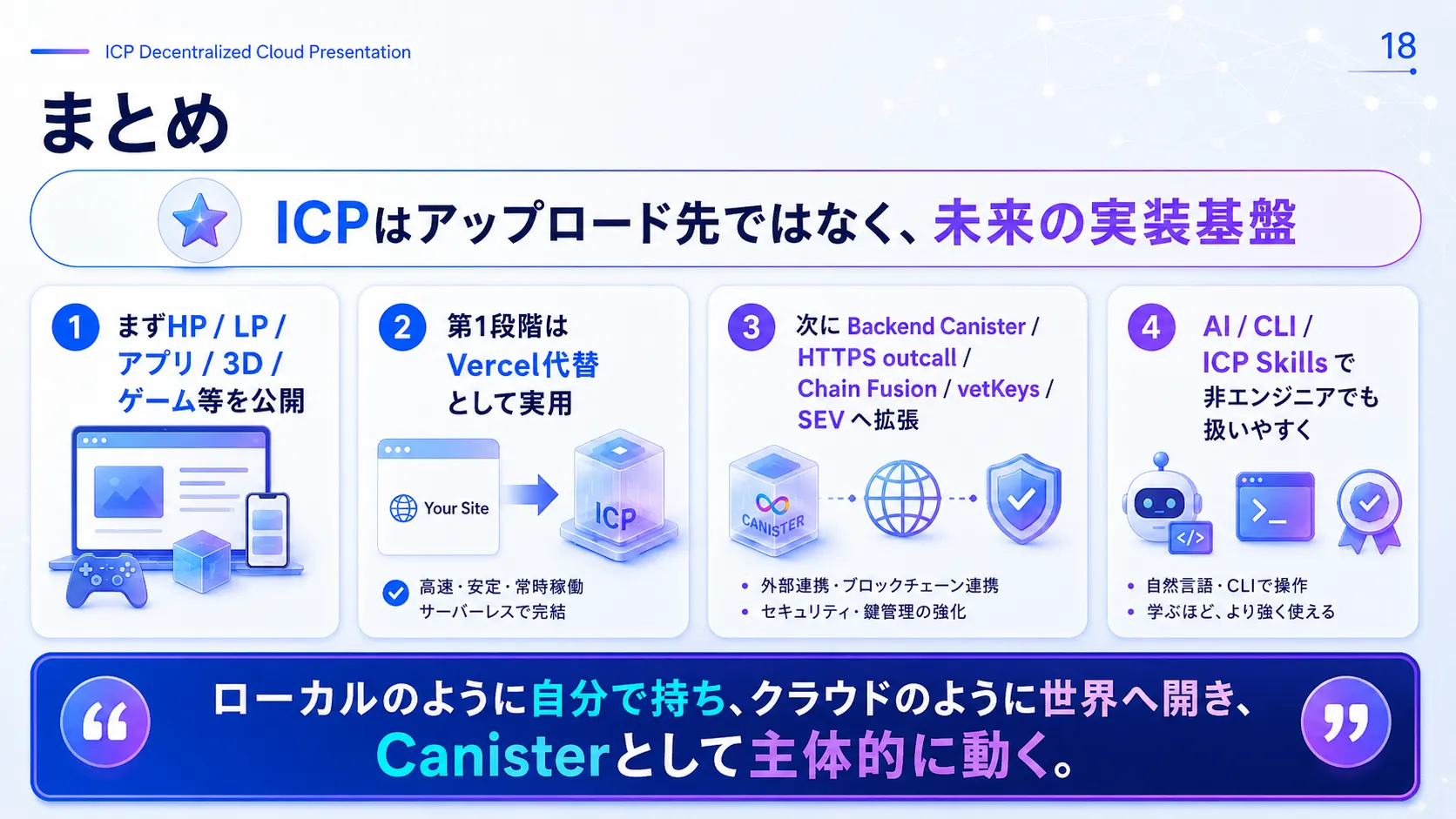
Start by publishing your websites, LPs, apps, 3D, and games on ICP. Use it first as an easy alternative to Vercel, then extend it with backends, encryption, and AI agents. As AI, CLI, and ICP Skills evolve, not only developers but every individual will be able to own an autonomous web.
“Own it like local files, open it to the world like the cloud, and let it act on its own as a Canister.”
Frequently Asked Questions
What can I upload to ICP?
Any published asset that runs in a browser after building: websites, LPs, web apps, PWAs, 3D sites built with three.js / WebGL, web games, and static content including images, audio, and video.
How is it different from Vercel or AWS?
Vercel and AWS can also handle websites, APIs, external integrations, and AI. The difference is not features but where your web assets live and where ownership is centered. On ICP, you can publish websites and apps as real entities on Canisters managed with your own identity.
Do I need to build a decentralized app from the start?
No. You can start with static hosting—deploying the `dist/` generated by `npm run build` to an Asset Canister.
Is ICP cheap?
One comparison estimates about ¥30,360 per year for SaaS like Wix versus about ¥4,233 per year for ICP plus a domain—a difference of about ¥26,127, or roughly 86% cheaper. But the essence is not just low cost; it is a publishing platform you can own.
Is this Sho T official site also published on ICP?
Yes. This Sho T official site itself is published on the ICP decentralized cloud. This `/lp/icp-sovereign/` page is both an explainer and a working demo published on ICP.
What comes next?
Combining Backend Canisters, HTTPS outcalls, Chain Fusion, vetKeys, SEV Subnets, AI agents, ICP Skills, CLI, and more to expand from hosting into a decentralized app platform.
Take Back “Ownership” of Your Web Assets
Move beyond dependence on big clouds, toward assets on a decentralized network tied directly to your identity. Why not start with static hosting?